
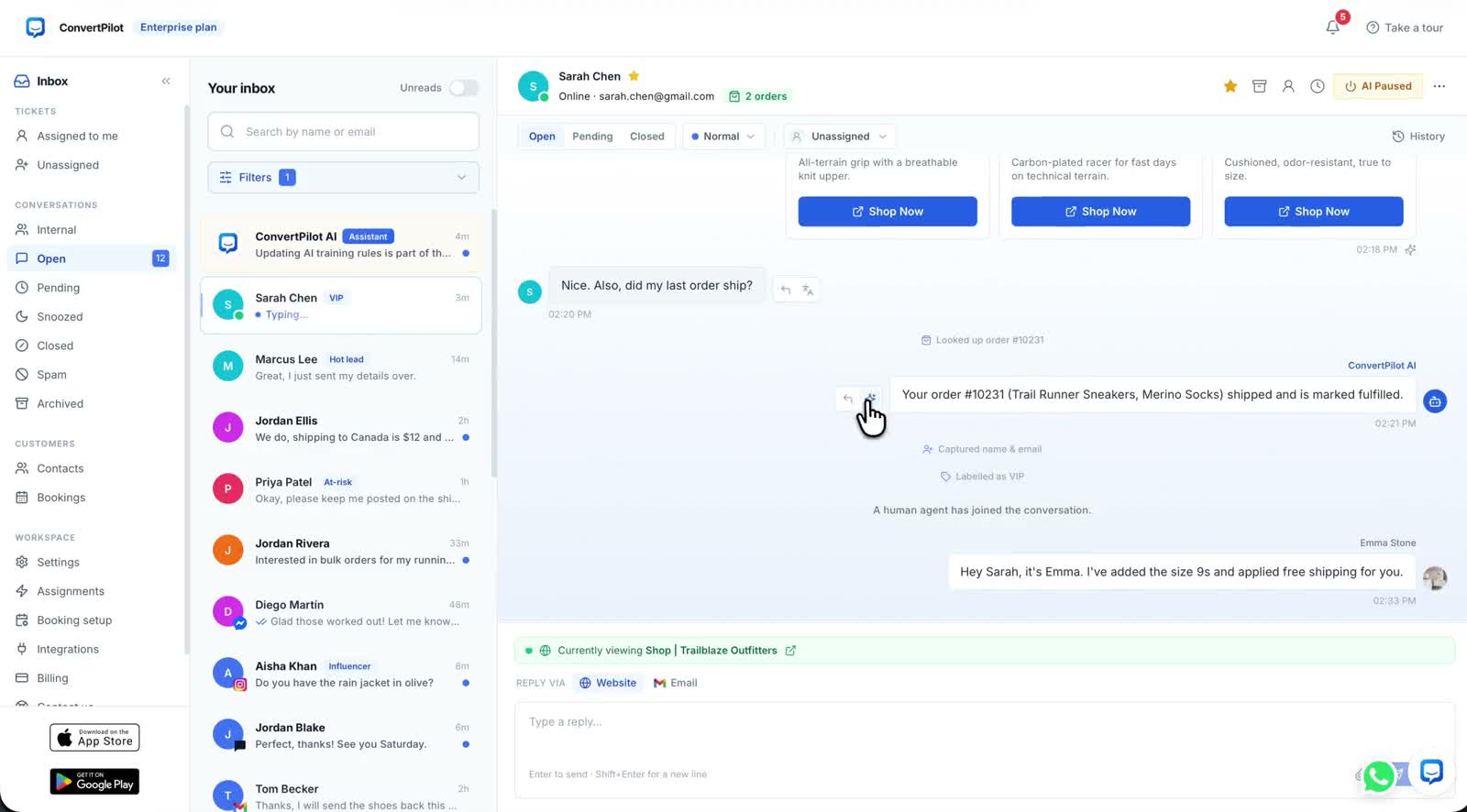
AI chatbot human handoff is the part of an AI agent your customers actually judge you on. Nobody remembers the twenty routine answers that went well. They remember the one time they asked for a person and kept getting a chatbot. Handoff is not a failure of the agent, it is the feature that makes the rest of it safe to switch on.
This guide covers what pauses the agent in ConvertPilot, which requests should always reach a person, how to make sure somebody is notified, and the checks to run before you rely on any of it. It assumes you have already written some rules; if not, start with the guide to training the agent, because handoff rules and answer rules live in the same list.
What handoff means in the console
Handoff in ConvertPilot is a pause, not a transfer to a different system. The conversation stays in the same thread, on the same channel, with the same history. What changes is who is writing. The agent pauses when a teammate joins the conversation or when you switch AI replies off for that conversation, and it asks for a person itself when a customer asks for one or when a reply would break one of your rules.
The thread records it. The inbox shows a system event reading "A human agent has joined", with "AI paused for this conversation" underneath, so anybody opening the conversation later can see exactly where the voice changed. That matters more than it sounds: most arguments about what was promised to a customer are really arguments about who said it.
Handoff is a pause in the same thread, not a transfer to another tool. The customer never repeats themselves.
Human handoff is on every plan, including Free, alongside Online hours and internal team chat. It is not a feature you upgrade for, which is deliberate: an agent that cannot step aside should not be answering in the first place. That holds whether the agent is reading live store data on Shopify or working from the pages of a custom site. The current allowances and seat counts are on the pricing page.
The four things that pause the agent
Two of these are yours to trigger, and two the agent decides. Knowing which is which tells you where to put the work.
- A teammate joins the conversation. The most common one. Someone opens the thread and replies, and the agent steps aside for that conversation.
- You switch AI replies off for the conversation. Useful when you can see a thread going wrong and want to hold it before you have time to answer properly.
- The customer asks for a person. The agent asks for one on their behalf rather than deflecting. This is the case worth testing first, because it is the one customers try.
- A reply would break one of your rules. This is the powerful one, and it is only as good as the rules you wrote. A boundary that exists only in your head is not a handoff trigger.
The fourth is where most of the value sits. If you never want the agent to approve a refund, discuss a chargeback, or discuss an order that is not the customer’s own, write those as rules rather than hoping the model is cautious. Rules are also what the trace shows afterwards, so a handoff you configured is explainable and a handoff that happened by luck is not.
Separately from all four, Automations sets AI replies on or off per channel, and who new conversations there are assigned to. That is a coarser control than handoff and a useful one: a channel you have not tested yet can run with AI replies off while the rest keep running.
What should always reach a person
The boundary is not about difficulty. It is about consequence. An agent grounded in your pages, products and orders answers hard questions well. What it should not do is commit you to something, or handle a person who is already upset.
| Situation | Let the agent handle it | Hand to a person |
|---|---|---|
| Order status | Read the order and the fulfilment state and give the tracking details. | An order it cannot find, a disputed delivery, or a request about somebody else’s order. |
| Returns and refunds | Explain the published policy and its exceptions. | Approving a refund, a replacement or an exception to the policy. |
| Price and discounts | State the published price and any published offer. | Negotiating, or any discount that is not already published. |
| A complaint | Acknowledge it, and hand over. | Everything after the acknowledgement. |
| Anything legal or medical | Nothing. | All of it, immediately. |
One addition for channels where the customer is close to buying. On Instagram and WhatsApp a complaint is one screenshot away from being a post, which is why the Instagram DM guide puts complaints on the human side of the line without qualification. The same reasoning applies on any public channel you connect.
The agent also flags messages that look like spam or a scam before they cost your team time, and it detects the customer’s language and shows your team a translation of every message. Both of those reduce the number of handoffs you need to staff, which is a quieter benefit than it first appears.
A handoff nobody sees is a handoff that failed
This is where handoff usually breaks, and it has nothing to do with the AI. The agent correctly decides a person is needed, the conversation sits in the inbox, and nobody looks at it for four hours. From the customer’s side that is indistinguishable from being ignored.
- Turn on push notifications. The iOS and Android apps send push notifications for new messages and handoffs, and carry the whole inbox. This is the single highest-value thing on this list for a small team.
- Post handoffs into a channel. The Slack integration posts new conversations and handoffs to a channel you pick, with links straight back to the conversation. Connect it in Settings › Integrations › Slack.
- Assign new conversations deliberately. Automations sets who new conversations on each channel go to. An unassigned queue is everyone’s job, which means it is nobody’s.
- Set Online hours honestly. Online hours are your live-chat hours per day in your time zone; outside them the widget shows your away message and the agent keeps answering what it can. Do not set hours you will not cover.
- Use internal team chat instead of a second thread. Notes to each other belong beside the conversation, not in a separate app where they lose the context.
Online hours govern the website widget’s away message. They are not a promise on every connected channel, so decide separately who watches each channel and when, and say so in your away wording rather than implying cover you do not have.
The first message after the handoff
The customer has just been talking to an assistant. When a person arrives, say so. A short line naming yourself, then a sentence showing you have read the thread, beats a generic greeting that makes the customer wonder whether they have to start again.
You do not have to reconstruct anything. The conversation, the contact profile, the orders, the labels and the notes are all in the same screen, and every AI message in the thread opens a trace showing what it remembered, the sources it used and which of your rules applied. If the reason for the handoff was a bad answer, that trace tells you where the fix belongs: missing context goes in the Knowledge base, a fixed boundary goes in a rule, and a missing order detail is a data question rather than a wording one. The guide to live order data works through that last case.
When you are done, the agent resumes for the next conversation as normal. Handoff is per conversation, not a global switch, so one difficult thread does not take your automation offline.
Test it before you rely on it
Four tests, run as a customer on a real channel, not as an admin in a preview. Do them again after any change to your rules.
- Ask for a person, plainly. "Can I speak to someone?" The agent should pass it to a person rather than answer around it, and you should get the notification.
- Ask for something a rule forbids. Request a discount that is not published. Check both the refusal and the handoff, and read the trace to confirm the rule is what stopped it.
- Complain. Send a genuinely annoyed message. The agent should acknowledge and hand over rather than defend anything.
- Take over mid-conversation. Join the thread from the mobile app and confirm the AI pauses, the system event appears, and the customer sees your reply on the same channel.
If a test fails, switch AI replies off for that channel in Automations while you fix the rule, and leave your other channels running. Then run the failed test and one ordinary question again before switching it back on. Once the four pass, the Why this reply trace and, on Premium and above, the analytics on conversations, resolution and response times are what tell you whether the boundary is set in the right place over time.