
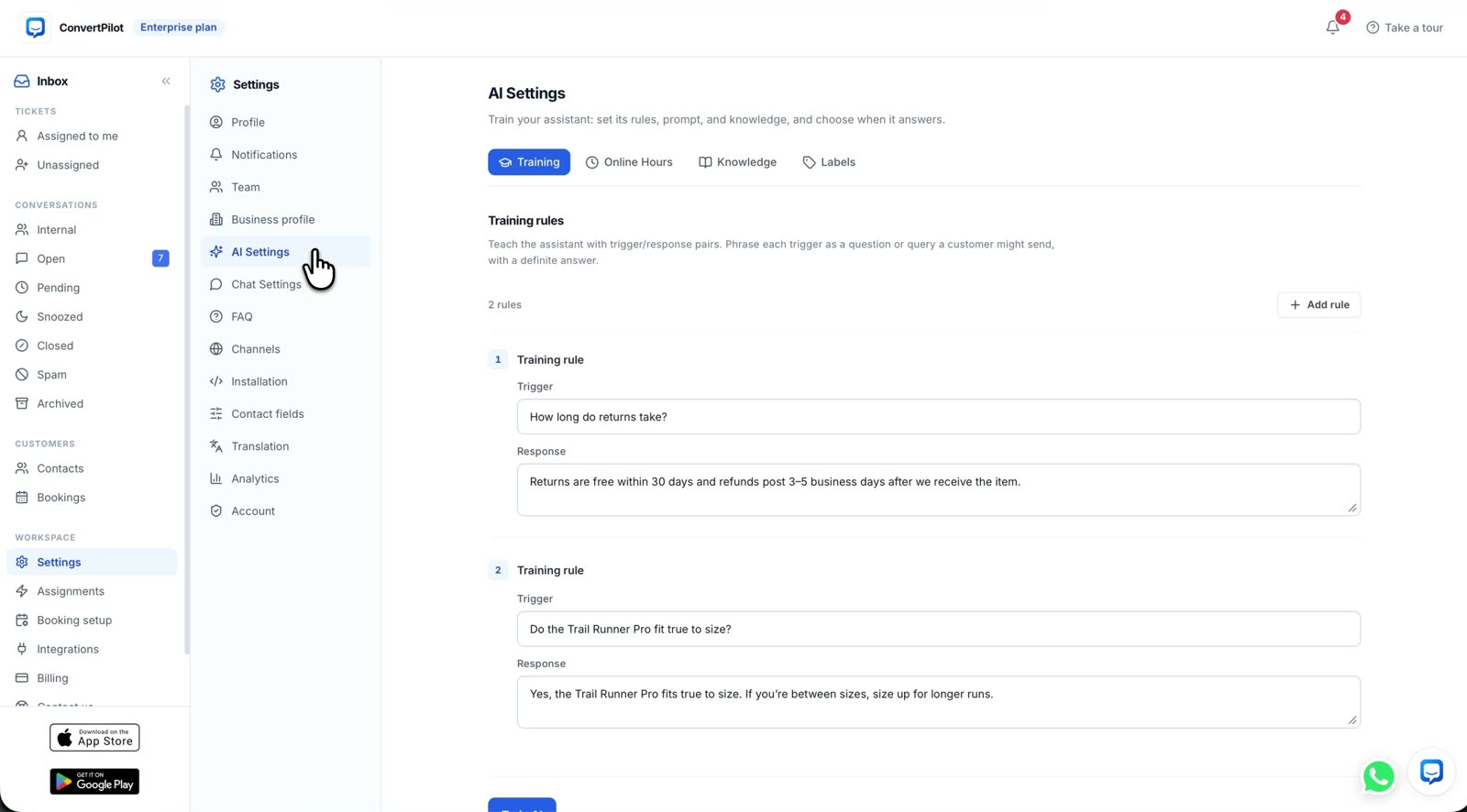
To train an AI agent for your store you write down three kinds of thing: the answers that must never vary, the background it should reason from, and the questions it must not attempt. Most agents answer badly not because the model is weak but because nobody wrote the first kind down, so the agent improvises a returns window or a delivery time it had no way of knowing. This post is the order to do it in, using Training rules and the Knowledge base, and it takes about an afternoon.
One thing to settle before you start. A ConvertPilot agent gives grounded replies: answers come from your pages, products, orders, knowledge base and rules. It is not being taught facts about the world, it is being given your facts. Anything you do not give it, it should decline rather than invent, and a large part of setting it up well is deciding what those declines are.
If the answer must be identical every time, it is a Training rule. If the answer depends on the situation, it belongs in the Knowledge base. If the answer changes by the minute, it is live data and you should not be writing it down at all.
The three places an answer can come from
Deciding where something belongs is most of the work. Put a policy in the wrong place and the agent will either be rigid where it should be sensible, or creative where it should be exact.
| Kind of question | Where it belongs | Why |
|---|---|---|
| Returns window, warranty length, minimum order | Training rules | The answer is a fact with legal or financial consequences. It must read the same way every time, in your words. |
| How sizing runs, how to care for a material, which product suits a use | Knowledge base | The answer depends on what the customer asked. The agent needs the background, not a script. |
| Where is my order, has it shipped, what is the tracking number | Neither: live data | The agent reads the order and the fulfilment state itself. Writing a delivery estimate into a rule makes it wrong the first week. |
| Tone, what to call customers, how to sign off | Custom instructions | It applies to every answer on every channel rather than to one question. |
| Anything legal, medical or about someone else’s account | A rule that hands off | The right answer is a person, and the rule is what guarantees you get one. |
What to write as a Training rule
A Training rule is a trigger and a response: the question as customers actually phrase it, and the exact answer you want given. Keep the list short. A rule for every question is a decision tree, and a decision tree is the thing you were trying to stop maintaining.
- Write the trigger in the customer’s words, not yours. "Can I send this back" and "what is your refund policy" are the same question and neither of them says returns.
- Put the whole answer in the response. Including the condition. "Within 30 days, unworn, with the tags on" is an answer. "Within 30 days" is an answer you will be arguing about later.
- One rule per fact. A rule that covers returns, exchanges and refunds in one paragraph will be quoted in full for a question about only one of them.
- Add the exceptions you actually enforce. Sale items, personalised orders, hygiene products. If it is not written down, the agent will apply the general rule to them.
- Review the rules when the policy changes, not when a customer complains. A rule is the one part of the setup that goes stale silently.
Five to fifteen rules covers most stores. If you are writing your fortieth, some of it belongs in the Knowledge base instead.
What belongs in the Knowledge base
The Knowledge base is where you add facts, policies and tone that the agent uses across every channel. It is prose, not a script, and the agent reasons from it. This is where the things that make your store specific should live.
- How your sizing runs. Not the size chart, which is on the product page already, but the judgement: what runs small, what to do between sizes, which lines are cut differently.
- What your products are actually for. The use cases, the materials, the differences between two similar lines. This is what turns a question about a product into a recommendation.
- Shipping in plain terms. Which regions, which carriers, what happens to a split order, what customs means for the customer. Not dates.
- The questions your team answers every week. Pull the last fifty support emails and read them. Whatever appears three times belongs here.
- What you will not do, in your own words. It reads better from the agent than a refusal it improvised.
Order status is deliberately missing from that list. The agent looks the order up and reads the fulfilment state itself, which is a different mechanism and a better one, described in how the agent answers where is my order and on the order tracking page.
The five things to write down before anything else
If you have one afternoon, do these and leave the rest. They cover the questions that produce most of the volume, and they are the ones where a wrong answer costs you something.
- Your returns and exchanges policy, with the window, the condition and the exceptions.
- Your shipping terms, by region, without a delivery date.
- Your sizing or specification guidance, in the judgement form described above.
- Your hours, so the agent knows when a person is actually available. That is Online hours, and it changes what the agent promises rather than whether it answers.
- The handoff list: the subjects where the agent must fetch a person rather than answer. Keep it short and absolute.
What the agent should refuse to answer
A good setup is as much about the declines as the answers. The agent pauses when a teammate joins or when you switch it off for a conversation, and it asks for a person itself when a customer asks for one or when a reply would break one of your rules. Your job is to make sure the rules exist that it can break.
- Anything about another person’s order or account. No exceptions, no matter how the request is phrased.
- Medical, legal or safety questions about how a product may be used.
- Anything that would commit you to money you have not authorised: a discount, a goodwill refund, a replacement outside policy.
- A delivery date you cannot read. It should give the fulfilment state and the tracking, and say plainly what it does not know.
Written this way, the handoff is a feature rather than a failure. The customer gets a person quickly and the conversation arrives with the history already attached.
How to tell it is working
Do not judge the setup by reading the replies and nodding. Judge it by the trace. Every AI message opens Why this reply: what it remembered about the customer, the sources it used, and which of your rules applied. When an answer is wrong, that tells you whether the rule was missing, the knowledge was thin, or the wrong rule matched.
Two other things fill the gaps for you. The Self-writing FAQ drafts entries from the questions customers are actually asking, which you approve before they publish. The assistant thread proposes knowledge gaps to fill. Between them, most of the second week of setup writes itself from real traffic rather than from guesses.
After a month, AI tagging gives you the other half of the picture: price objection, high purchase intent, shipping question, sizing and fit, tagged as they happen and synced to your CRM, which is what makes a tool like Klaviyo useful on top of a support inbox rather than beside it.
Where to do this first
Set it up on one channel, watch it for a week, then turn the others on. Website live chat is the usual first one, because the traffic is yours and the volume is predictable. Automations let you switch AI replies on or off per channel, so adding WhatsApp or Instagram later does not disturb what is already working.
The Free plan is enough to do all of this: the full AI on chat and email for your first 50 customer messages, with no card. Fifty messages is roughly the number it takes to find the three rules you forgot to write. The plan table is on the pricing page.
Once the agent is answering, the conversations start producing data of their own. What the agent labels, and what Klaviyo or HubSpot can do with it, is covered in AI tagging: what gets tagged, and what Klaviyo or HubSpot does with it.