
Customer service software for a small business should give customers a clear way to ask, give your team one place to answer, and show what happened when a question needs follow-up. Start with the conversations you already receive. If a tool cannot handle a missing order, a policy exception and a request for a person on the channels you actually use, its feature list will not help your customer.
You may need an email help desk, website live chat, a shared inbox for messaging, or an AI agent that answers routine questions. Those are different starting points. This guide gives a small store or service team a way to choose, test and budget for the work. ConvertPilot is one option in that test: it combines an agent with a shared inbox, store connections and human handoff. Check its limits as carefully as you check any other candidate.
What should customer service software for a small business do first?
Make the first job specific. If most questions arrive by email, you need ownership and history before you need another chat bubble. If shoppers ask about size and delivery on product pages, website chat may shorten the path to an answer. If customers message your business number, check whether WhatsApp Business is supported on the plan you can use. A service business taking appointments may need bookings more than order tracking.
| What customers do | First capability to test | Failure case to include |
|---|---|---|
| Email a question and reply later | One thread with an owner and full history | A second reply must stay with the first |
| Ask about a product on the site | Website chat with current product information | The requested variant is unavailable |
| Message a social or business account | The real channel in a shared inbox | The team takes over without changing channel |
| Ask where an order is | A matched order and recorded fulfilment state | The order cannot be matched safely |
| Ask to book a service | A slot offered and confirmed from a schedule | The requested slot is unavailable |
ConvertPilot lists Website live chat and email on Free, with WhatsApp Business, Messenger, Instagram and Telegram on Premium and above. Its booking tools cover services, staff schedules, a booking page and payment through your own Stripe account. The channel list and booking page show where these paths fit. If your customers use a channel the tool does not support on your plan, account for that before signing up.
Do you need a help desk, a shared inbox or an AI agent?
A help desk is useful when cases need assignment, status and a record of what was decided. A shared inbox is useful when a small team must see and reply to conversations from more than one channel. An AI agent is useful when the answer already exists in a current page, product, order or approved rule. It can respond quickly to that repeat question, but it does not own a refund decision or make an absent delivery date true.
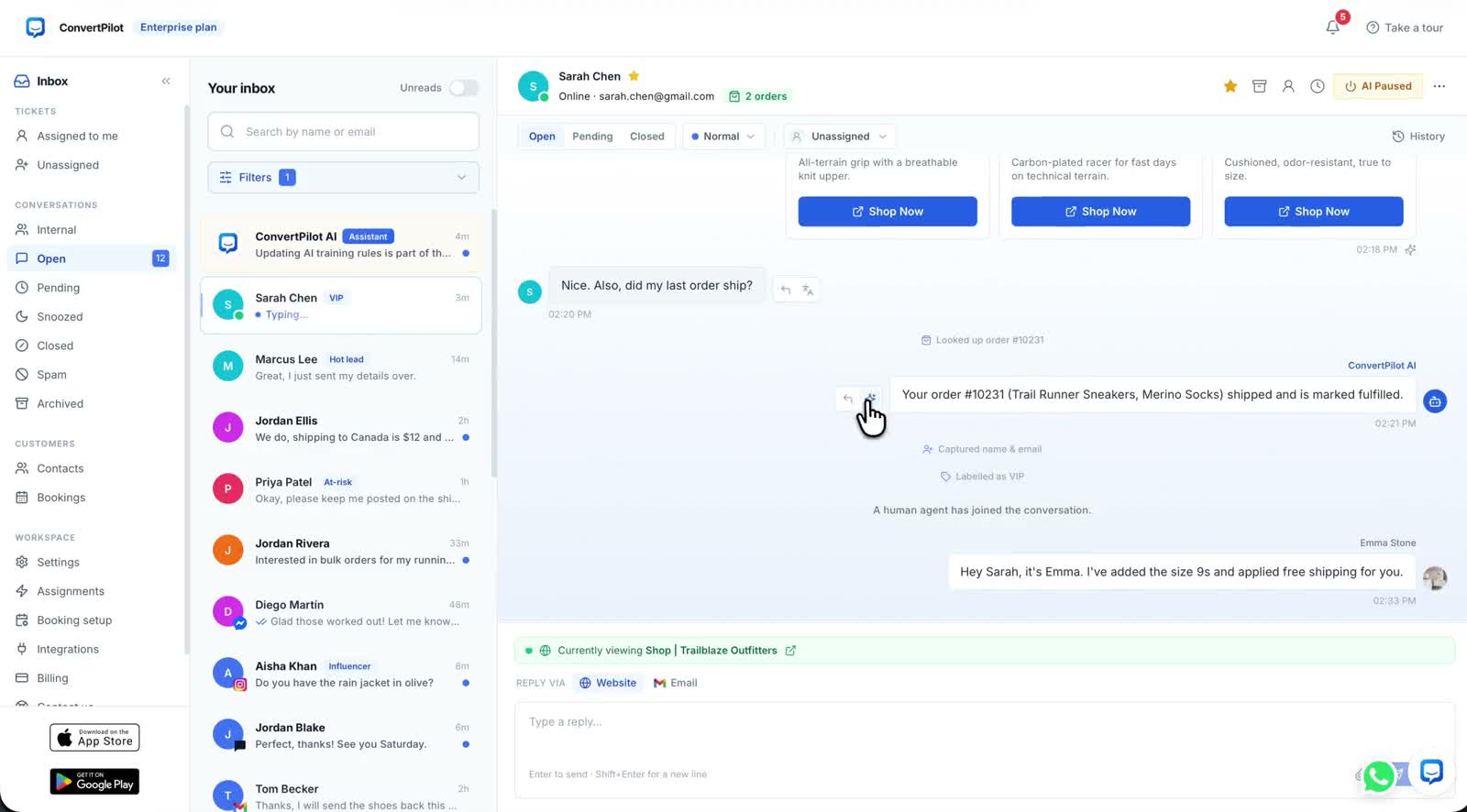
The useful arrangement may include all three jobs. In ConvertPilot, messages from supported channels appear in one conversation list with statuses, assignment and priority. The agent uses pages, connected Shopify or Wix products and recent orders, and the answers and rules you add in Training. A teammate can join the thread and the agent pauses. The feature tour shows the inbox beside the agent rather than treating automation as the whole product.
A good support tool makes the next owner obvious when an answer is missing.
How do you test the software with your own customers’ questions?
Use a small set of real questions from your existing inbox. Keep the source open for each one: the product listing, order record, booking calendar or policy page. If you cannot check the correct answer yourself, you cannot judge the software answer. Ask from the published customer page and then inspect what the teammate sees. The aim is a repeatable acceptance test, not a polished vendor demonstration.
- Pick three common questions. Include one product or service question, one status question and one policy question.
- Choose one uncertain case. Use an unmatched order, unavailable slot or policy exception to see whether the system admits a limit.
- Ask for a person. Confirm the customer receives a clear next step and a named teammate can read the earlier messages.
- Return on another device. Check that the conversation and assignment are still understandable from a phone.
- Record each result. Note the answer, its source, the assigned owner and the correction needed before launch.
For an AI answer in ConvertPilot, open Why this reply to see the sources and rules it used. The AI customer service guide gives test cases for product, order and policy questions. The human handoff guide covers the other half: what the customer sees while waiting and whether your team can act on the thread. Run both tests before judging the agent by its response speed.
What setup work will your team actually own?
Someone must maintain the facts the software uses. Update the shipping and returns pages when your policy changes. Keep products, availability and service schedules current. Write a short rule for cases a person must approve. Assign an owner to the inbox, set Online hours and check the away message. A tool cannot fill gaps in your operating process by guessing.
- One source of truth: Name the page or system that controls each common answer.
- One inbox owner: Decide who checks open and urgent conversations each day.
- One handoff rule: Send complaints, exceptions and unsupported answers to a person.
- One review habit: Recheck the test questions after a policy, product or staff change.
ConvertPilot lets you add exact answers, facts and custom instructions in Training. Online hours and per-channel automations control the waiting experience and assignment defaults. The store Training walkthrough explains how to separate a fact from a rule. If your team cannot name who owns those entries, keep the initial rollout small until that responsibility is clear.
How should you compare plans without paying for unused channels?
Write down the channels you need now, the people who will answer and the volume of customer questions. Then compare those needs with the plan gate, seats and message or AI reply allowance. ConvertPilot Free includes Website live chat and email with an initial 50 customer messages and five team seats. Its paid tiers increase allowances; Premium adds WhatsApp Business, Messenger, Instagram, Telegram, analytics and listed CRM integrations. SMS is separately scoped under Custom. Check the current plan table before choosing, since allowances can change.
A small store should not pay for four messaging channels when it has only tested website chat. Equally, a low entry price is not a bargain if the channel where customers already write is unavailable. Estimate the next step from your own inbox and test it on the plan you expect to keep. For Shopify or Wix, the Shopify connection and Wix connection explain how the store data reaches the agent. A custom site uses its pages and products you add.
What is a sensible first week?
Choose one channel, one owner and a few questions with written answers. Publish the chat or connect the inbox, then test a correct answer, an uncertain answer and a handoff from a phone. Read the resulting threads with your teammate. Correct missing sources before expanding to another channel. The mobile app can keep the inbox available away from a desk, but a notification is only useful if somebody has agreed to act on it.
If ConvertPilot fits that test, start on the channel your customers already use and keep the acceptance set for future changes. If another tool fits better, use the same evidence to choose it. The point is a support path your customers can trust and a team that knows who answers next.