
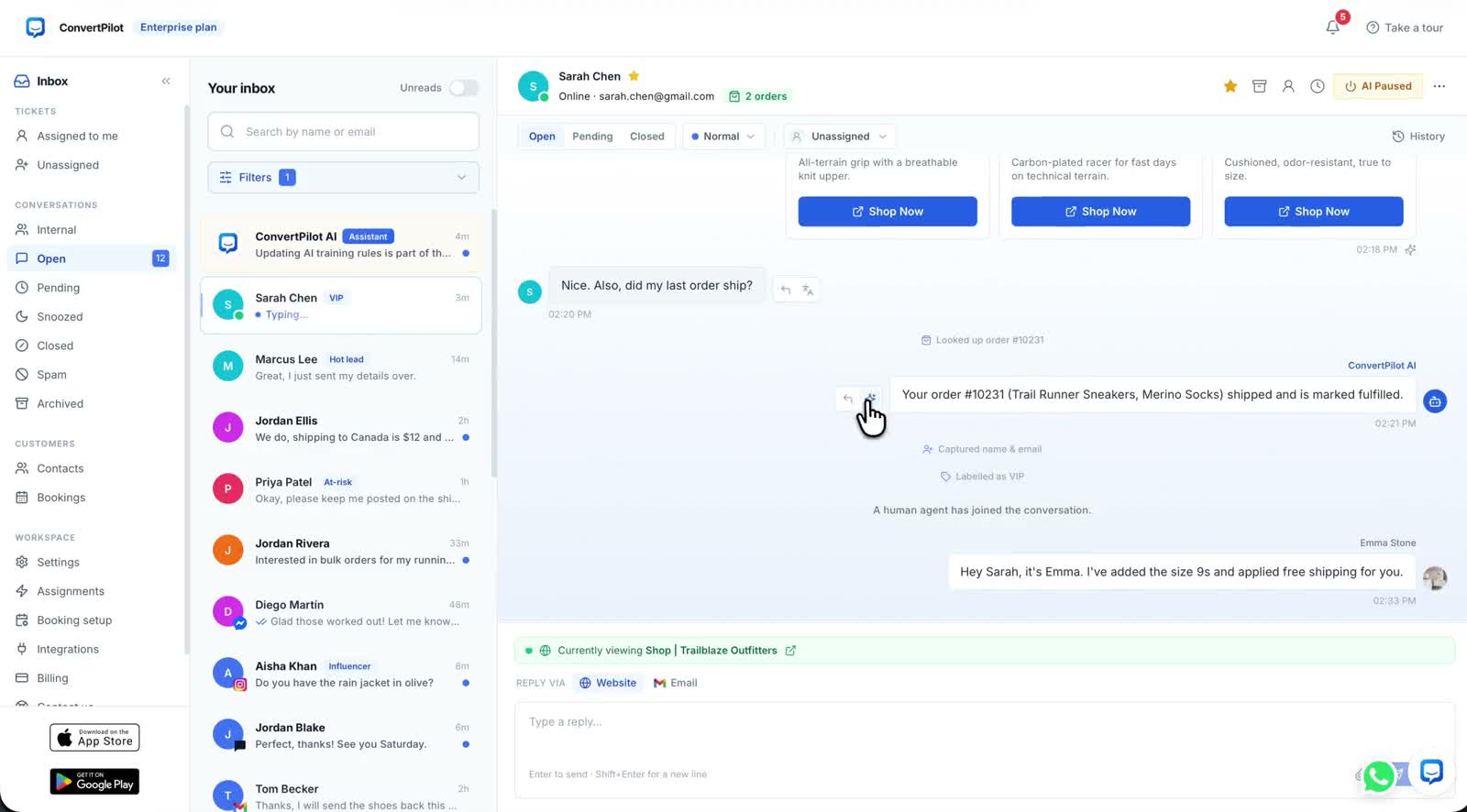
An AI chatbot for customer service answers routine questions from information your business can verify, then brings in a person when a decision or missing fact makes the answer uncertain. For an online store, that means questions about products, orders, shipping and returns. It does not mean giving the bot permission to invent a delivery date or approve a refund. The useful goal is a customer who gets an accurate next step, whether that comes from the agent or your team.
ConvertPilot is one way to run that workflow. Its agent reads your pages, connected Shopify or Wix products and recent orders, plus the facts and rules you add in Training. The conversation stays in a shared inbox when a teammate takes over. Start with the questions your customers actually send, then test both a good answer and a case the agent must decline.
What does an AI chatbot for customer service do?
It receives a question, finds relevant business information, replies in the customer’s channel and keeps enough context for a follow-up. A fixed menu of buttons can route people to a page; a grounded AI agent can answer a specific question such as “Is the blue medium in stock?” or “Has my order shipped?” The distinction matters when a shopper asks a second question that the menu did not anticipate.
A fluent reply is not evidence that it is correct. In ConvertPilot, Why this reply shows which source and rule the agent used. Read that trace beside the answer. If the source is an old returns page, update the page or Training entry before trusting another reply. The features page shows how the source trace, order lookup and inbox fit together.
Which customer questions should the chatbot answer?
Begin with questions that have a written or connected source and a clear correct answer. Product availability, a published size guide, a return window and the fulfilment state of a matched order are better starting points than disputes or exceptions. Write down the source and the failure case for each question before switching on automatic replies.
| Customer question | Source to check | Safe next step |
|---|---|---|
| Is this size in stock? | Published product variant and availability | Show the matching product or say the variant is unavailable |
| Where is my order? | Matched recent order and its fulfilment or tracking state | Report the recorded state; hand off an unmatched order |
| Can I return this? | Current returns policy and purchase details | Explain the policy; send an exception to a person |
| Can you guarantee Friday delivery? | Published shipping terms and confirmed carrier information | State what is known; ask a person to assess any guarantee |
The connected store record matters. ConvertPilot reads Shopify or Wix products and recent orders, while a custom site uses its pages and products you add. The Shopify connection and Wix connection describe the two store paths. If your shipping page and order record disagree, fix the business source first. A better prompt cannot make conflicting information true.
What should you set up before the agent replies?
Give the agent a small set of trustworthy facts and boundaries. Check your product pages, shipping and returns pages, size guide and contact details. Then add exact answers for questions that must be worded consistently, such as a return condition. Put judgement boundaries in Training rules: no refund approval without a teammate, no arrival promise without carrier evidence, and a person whenever the customer asks for one.
- Pick five real questions. Read recent inbox threads and write the answers your team currently gives.
- Find the source. Match each answer to a current page, product, order field or approved Training entry.
- Define a stop point. Decide which missing details, complaints or exceptions need a person.
- Set ownership. Assign who reads the inbox, set Online hours and write the away message.
- Test one channel first. Begin on Website live chat, then add other channels when the answers and handoffs work.
The store Training guide helps you separate a fact from a rule. A fact tells the agent what the store knows; a rule says what it may do with that information. Keep both short enough that your team can check them when a policy changes.
Do not judge a chatbot by how many questions it answers. Judge it by whether each answer has a current source and each uncertain case reaches a person.
How do you test customer service replies before launch?
Use a test product and order you can inspect in your own store admin. Ask the same question a shopper would ask on the published site, not only in a console preview. Read the reply, open Why this reply and compare the cited source with the current record. Repeat from a phone, where the widget and handoff prompt must be readable. The test is complete only when the customer path and the teammate path both work.
- Known answer: Ask about an in-stock variant and compare the reply and product card with the live listing.
- Missing answer: Ask about an old or unmatched order. The agent should ask for details or hand off, not invent a tracking event.
- Policy exception: Ask for a refund outside your written policy and confirm a person owns the decision.
- Source inspection: Open Why this reply for every AI message and correct stale information before retesting.
- Handoff: Ask for a person and confirm the teammate sees the complete thread, including the question that triggered it.
Test after changing a policy too. An answer that was correct last month may be wrong now. Keep a short checklist tied to your most common questions so a new product range or return rule does not quietly break the customer experience.
When should a person take over?
A person should take over when the customer requests one, the order cannot be matched, the customer is upset, or a refund, discount or delivery promise needs judgement. ConvertPilot pauses the agent when a teammate joins and keeps the messages in the same thread. Its human handoff guide explains how to check assignment and the waiting experience. The agent should tell the customer what happens next, particularly outside Online hours.
An unattended handoff is not resolution. Decide who checks urgent conversations, how the contact will be reached and what the away message says. Your team can use the mobile apps to receive inbox notifications away from a desk. The customer should not have to repeat an order number that is already in the thread.
Which channel and plan should a small store start with?
Website live chat is the simplest first channel because you can test it on a page you control. In ConvertPilot, Website live chat and email are available on Free, subject to the Free message allowance. WhatsApp Business, Messenger, Instagram and Telegram are on Premium and above; SMS is a separately scoped Custom service. The channels page describes where conversations arrive, and current pricing lists the allowances and seats.
Do not connect every channel on day one if nobody owns the inbox. Start with one well-sourced answer and one reliable handoff. Once those work, use the same test questions on the next channel. The reason to use an AI customer service chatbot is to make routine help easier to get while your team stays responsible for the cases that need judgement.