
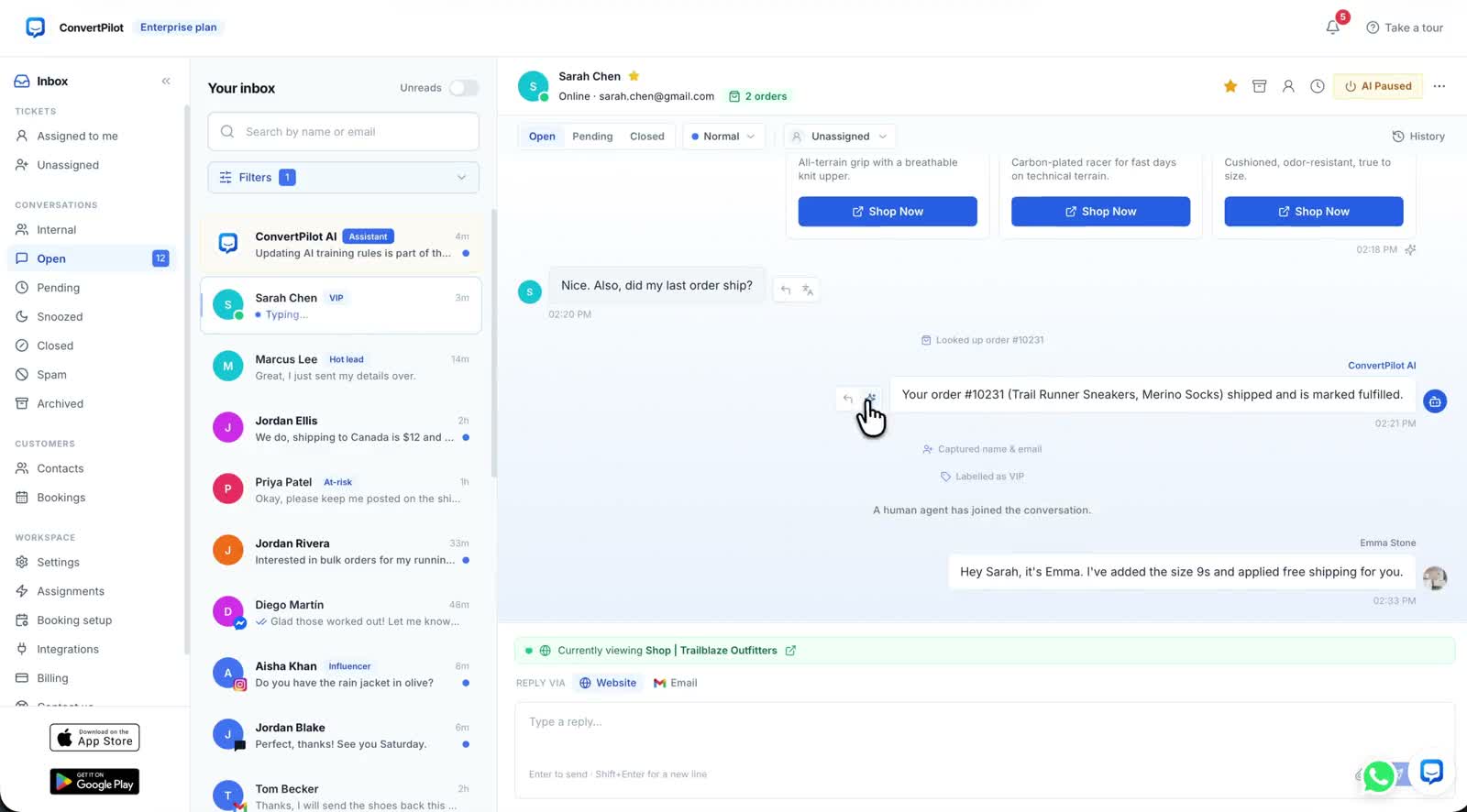
A Shopify customer service app earns its place when a shopper asks about a product, an order or a return and gets an answer your team can stand behind. The first message may arrive on a product page. The next one may arrive by email or Instagram. ConvertPilot connects your Shopify store to an AI agent and a shared inbox, so the answer and the conversation stay useful as customers move between channels.
Think about the last question that made you open three tabs. You checked a variant, searched the order, then copied a reply into another app. A good support setup brings the current store information to that conversation and leaves a clear route for your team to join. Here is how to put that workflow in place.
What should a Shopify customer service app answer?
Start with the questions that follow the sale from discovery to delivery. A shopper wants to know whether a colour is available. A buyer wants the recorded fulfilment state of an order. Someone else asks for your returns policy. Your app should draw each answer from the relevant current source: catalogue, order record or published page. A person should be able to see the same context when a question needs attention.
| Customer moment | Information needed | ConvertPilot path |
|---|---|---|
| Choosing a product | Current catalogue details, variant and price | The agent can answer from connected products and show a product card |
| Checking an order | Matched order and recorded fulfilment details | The agent reads recent orders through the Shopify connection |
| Asking about a policy | Your published shipping or returns page | The agent uses site pages and the facts you add in Training |
| Asking for a person | Earlier messages and the customer profile | A teammate joins the same conversation and the agent pauses |
The ConvertPilot Shopify connection brings products and recent orders into the agent’s working context. The feature tour shows the conversation, contact panel and Why this reply view. That view identifies which source and rule informed an AI answer, so your team knows where to update a stale detail.
How does Shopify live chat become a useful inbox?
Install the app and check the widget on a product page from a phone. Ask about the item you are looking at, then ask for a person. In ConvertPilot, the page-aware widget gives the agent context about the page open in the browser. The resulting conversation appears in the shared inbox with its status, assignment and customer profile. The full thread is there when a teammate takes over.
Email replies can continue in the same thread. When your business is ready for more channels, WhatsApp Business, Instagram, Messenger and Telegram can join the inbox on Premium. Native iOS and Android apps make the conversation available while your team is away from a desk. A store owner can start with website chat, learn which questions repeat, then connect the messaging accounts customers already use.
Can the app answer order questions without guessing?
An order question needs a matched record. ConvertPilot uses the Shopify connection to read recent orders and their recorded fulfilment and tracking information. Its agent can answer from that data and show the source in Why this reply. If the requested fact is missing, your team can receive the conversation and check it. The order status walkthrough follows this exact customer question.
Put your own store through the journey. Use a product with two variants and an order with a known fulfilment state. Ask the shopper question from the published page. Then inspect the answer in the inbox and open Why this reply. The answer should match the record you can see in Shopify. This gives your team a repeatable check whenever catalogue or fulfilment practices change.
How do you teach the AI your store policies?
Your Shopify catalogue cannot explain every exception. Add your shipping, returns, sizing and service information to the site pages customers can read. In ConvertPilot Training, add the exact answers your team repeats and facts the agent should know. Custom instructions set your tone and the rules for cases needing a person. The Training guide shows how to prepare the first entries.
- Product facts: Check the title, variant, availability and product page before inviting shoppers to ask about them.
- Order facts: Test a real recent order and its recorded fulfilment state.
- Store rules: Keep your shipping, returns and exchange wording current on your own pages.
- Team route: Assign an inbox owner and set Online hours so customers know what happens next.
The agent can draft FAQ entries from questions customers ask, and you approve them before publishing. This makes repeated questions useful for improving the site itself. The handoff guide helps your team test a request for a person from the customer side.
Which ConvertPilot plan fits a Shopify store?
ConvertPilot Free includes Website live chat, email, Training and five team seats for the first 50 customer messages. Plus raises the AI reply allowance and removes the customer-message cap. Premium adds WhatsApp Business, Instagram, Messenger, Telegram, analytics and the listed marketing and CRM connections. Choose the channels you need now and read the current allowances on the pricing page before you start.
If your customers ask most questions on product pages, begin with website chat. If they already write to your business number or Instagram account, plan those channels into the rollout. In both cases, the store connection and shared thread give the AI and your teammates a common starting point.
How can you launch in one focused session?
- Connect Shopify. Install ConvertPilot and confirm the widget appears on a product page.
- Pick three real questions. Choose a variant question, an order question and a policy question your team already answers.
- Read each source. Check the catalogue, order record and policy page before testing the agent.
- Ask from a phone. Open the live product page and send each question as a shopper would.
- Complete a handoff. Ask for a teammate, then reply from the shared inbox or mobile app.
A Shopify customer service app is ready for customers when the answers match your store and the next person can pick up the thread. ConvertPilot gives you that path from the widget through the order record to your team. Connect your Shopify store, test the three questions and build from the conversations you already receive.