
AI customer service statistics point to a simple question for a small business going into 2027: can a shopper get a useful answer while your team is busy elsewhere? The answer may begin on a product page, continue in a WhatsApp message and end with a teammate. An AI customer service agent helps when those steps share the same current information and conversation history.
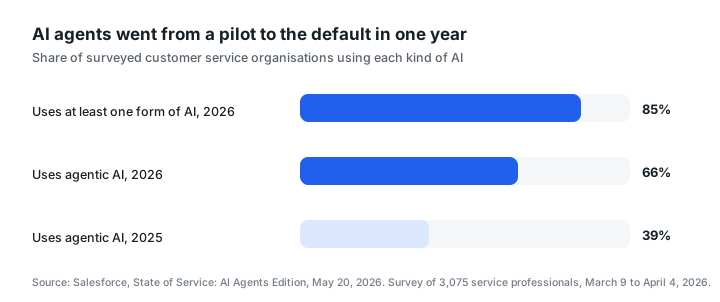
The market is moving quickly. Salesforce surveyed 3,075 service professionals worldwide in 2026 and found that organisations using AI agents rose from 39% in 2025 to 66% in 2026. The figures describe service organisations of many sizes. For a small store, the useful response is a focused first launch on the channel where customers already ask questions.
What do the AI customer service statistics show going into 2027?
The headline most small teams miss sits underneath that growth. When Salesforce asked which measure improved most after deploying AI agents, the answer was not average handle time or agent productivity. It was customer satisfaction, ahead of rep productivity, handle time, retention and first-response time. Speed was the easy win to predict. The experience improving is the one worth building for.
| Signal | Published finding | A small team can do next |
|---|---|---|
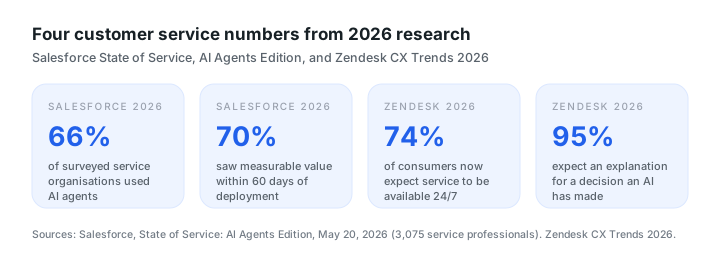
| AI agent adoption | 66% of surveyed service organisations used AI agents in 2026, up from 39% in 2025 | Choose one repeat question for the agent to answer from your own information |
| Early value | 70% of organisations using agents reported measurable value within 60 days | Set a short review date and count useful answers and handoffs |
| Customer expectations | 74% of consumers surveyed for Zendesk CX Trends 2026 said AI makes them expect 24/7 service | Give customers a useful answer or a clear next step outside team hours |
| Answer transparency | 95% of surveyed consumers expected an explanation for AI-made decisions | Check the source and rule behind each important reply |
These numbers describe adoption and expectations, not a promised result from buying software. The useful takeaway is practical: put an answer where the customer asks, connect it to current business facts and make the next human step obvious. An AI customer service agent becomes valuable when it handles a real question that otherwise waits in an inbox.
What customers now expect from a reply
The expectation side has moved further than the adoption side. Zendesk CX Trends 2026 reports that 83% of consumers still think experiences should be better than they are today, and that 85% of CX leaders say customers will drop a brand over an unresolved issue, even on first contact. A customer support chatbot that answers quickly but wrongly does not buy you goodwill; it spends it.
Two expectations matter most for a small team. According to Zendesk CX Trends 2026, 74% of consumers now expect service to be available around the clock because of AI, and 95% expect an explanation for a decision an AI has made. The first is about cover. The second is about being able to show your working, which is where most chatbot rollouts quietly fail.
The two gaps that decide whether a rollout works
The same Salesforce research contains two uncomfortable comparisons, and both are more useful than the adoption headline.
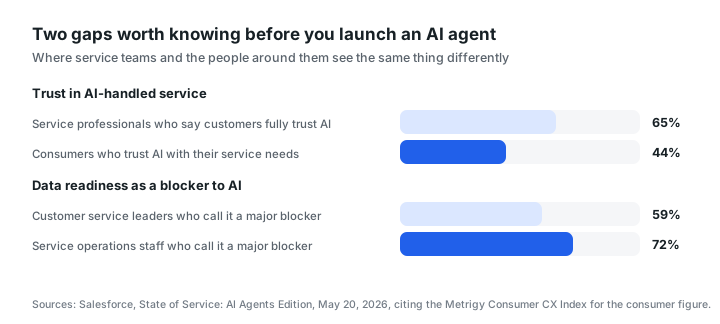
The first gap is trust. Salesforce found that 65% of service professionals believe their customers fully trust AI. The Metrigy Consumer CX Index puts the share of consumers who trust AI to handle their service needs at 44%. Salesforce notes that the scepticism tends to fade once customers actually experience AI-powered service, which makes the quality of the first answer a customer gets from you the whole ball game.
The second gap is readiness. In the same Salesforce research, 72% of service operations staff call data readiness a major blocker to AI, against 59% of leaders. The people closest to the information are the most worried about it. For a store, that translates directly: your agent is only as good as the pages, product records and written answers behind it.
Both gaps close the same way. Give the agent current, specific information, then be able to show the customer and your own team exactly where an answer came from.
That is what the Why this reply view is for. It shows the sources and rules ConvertPilot used for an AI message, so a teammate can check an answer in seconds and fix the source once instead of correcting the same reply in every channel. Against the 95% of consumers who expect an explanation, being able to produce one is not a nice extra.
Where should a small business put an AI customer service agent first?
Start with the channel that already receives your repeat questions. A Shopify or Wix store might begin with a product detail or order status question on the website. A service business may start with opening hours or a booking question. If your customers already message your business number, test the same answer on WhatsApp. The point is to improve an existing customer journey before adding new ones.
ConvertPilot puts Website live chat, email, WhatsApp Business and Instagram into a shared inbox, with the agent and your team working from the conversation history. Its Shopify and Wix connections can supply products and recent orders. On another website, the agent can use your pages and the facts you add in Training. The feature tour shows the agent, inbox and handoff together.
- Product question: Ask whether a specific item and variant are available, then check the reply against your catalogue.
- Order question: Ask about a recorded order and check the fulfilment state before publishing the answer flow.
- Policy question: Ask about a return or booking rule that is written on your site.
- Human request: Ask for a person and see whether the teammate receives the earlier messages.
What does an AI customer service software rollout look like?
Begin with three questions your team answered this week. Keep the source page or record beside each one. Add an exact answer or a fact in ConvertPilot Training where your site is unclear, then set the tone and rules for the agent. Publish Website live chat on one page and ask those questions as a customer would, from a phone. The store Training guide walks through the first entries.
- Choose a channel. Start with the website, WhatsApp Business or Instagram account that gets real questions today.
- Connect your information. Use current pages, products, orders and Training entries for the answers the agent will give.
- Test a useful answer. Open the published channel and compare the reply with the source you trust.
- Test handoff. Ask for a teammate and read the complete conversation from the inbox and mobile app.
- Review the first week. Find repeated questions and update the page or Training entry behind them.
Cover is the other half of the job. Against the 74% of consumers who now expect service around the clock, Online hours and a waiting message tell customers exactly what happens when nobody is at a desk, and the agent keeps answering the questions it has good information for. A teammate can then take over in the same thread, with the earlier question still visible, from the web console or the iOS and Android apps.
What this costs to try
The Free plan runs Website live chat and the email inbox with 50 customer messages, Training, Online hours, human handoff, bookings and 5 team seats, which is enough to test the one question your customers ask most. Plus at $8.99 removes the message cap and raises AI replies to 250 every 30 days. Premium at $17.99 is the one that opens WhatsApp, Messenger, Instagram and Telegram in the same inbox, plus the analytics dashboard and the Klaviyo, HubSpot, Mailchimp, Salesforce, Slack and Zapier connections. The full table is on the pricing page.
Which numbers should you read after launch?
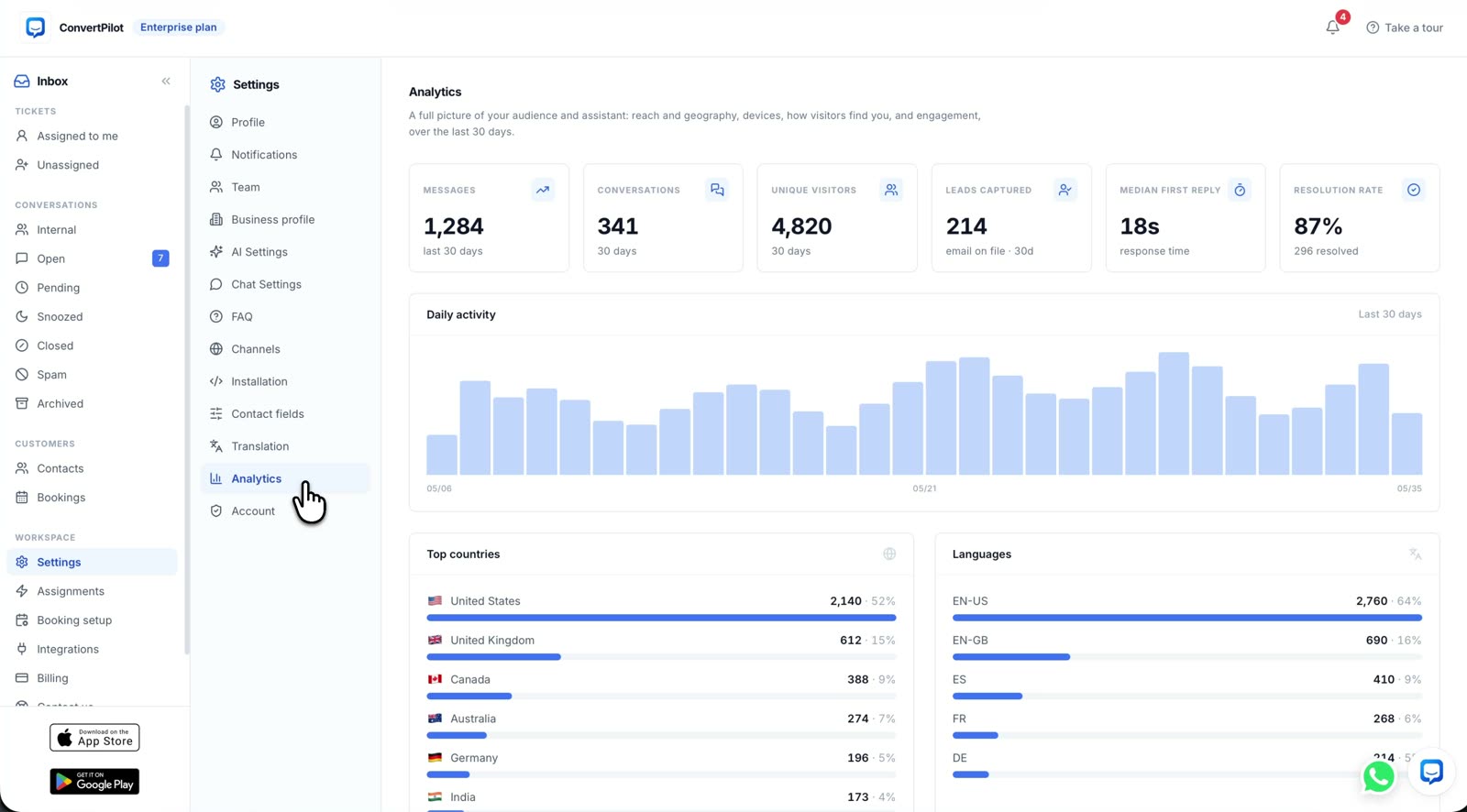
Read conversations, first reply time and resolution together. A quick first reply is useful, while a completed customer question is the bigger win. ConvertPilot’s analytics dashboard on Premium includes conversation volume, resolution, response times and activity by day, along with countries, languages, devices and sentiment. The small business inbox metrics guide shows how to use those views in a weekly routine.
Keep a small record of the question, the answer, whether a person took over and the next change to make. That turns an industry statistic into a decision your own team can use. A store can begin with Website live chat on the Free plan, then add WhatsApp Business and Instagram on the plan that supports those channels. Start with the one question your customers ask most often and make its answer easy to find.