
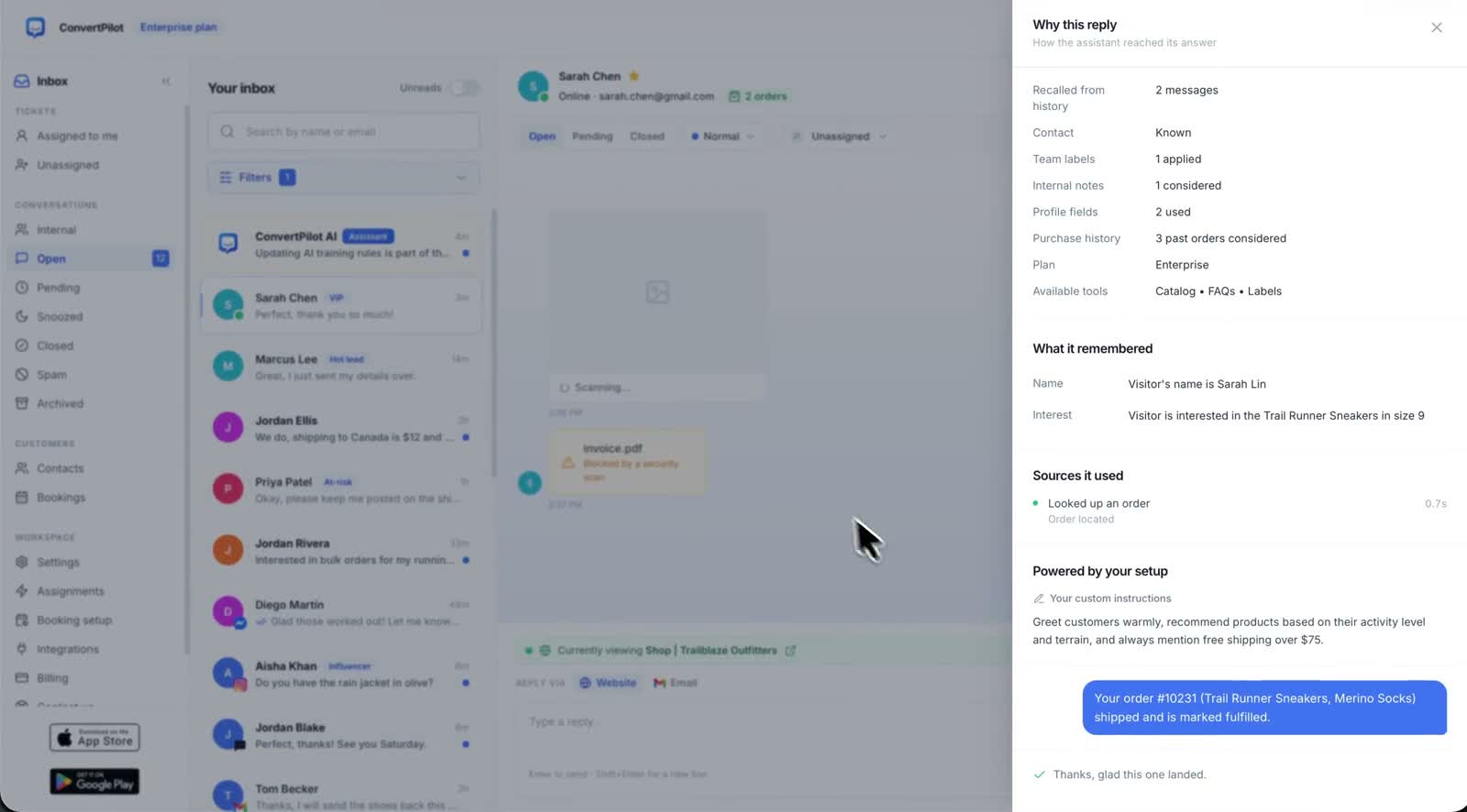
An AI chatbot audit trail is the difference between an agent you can run and an agent you have to watch. Every vendor will tell you their model is accurate. None of them can tell you why it said a particular sentence to a particular customer at half past four last Tuesday. That second question is the one you actually need answered, because it is the one a customer asks you when a reply was wrong.
In ConvertPilot every AI message opens a trace. The console calls it Why this reply, and it shows three things: what the agent remembered about the customer, the sources it used, and which of your rules applied. This guide covers how to read one, what to do when an answer was wrong, and the limits of what a trace can tell you.
What the trace actually shows
Open any AI message in the inbox and the trace sits with it. The three parts answer three different questions, and it helps to keep them separate in your head.
| Part of the trace | The question it answers | What you do with it |
|---|---|---|
| What it remembered | What did the agent already know about this person? | Check the memory is right. A wrong memory produces a confidently wrong answer. |
| Sources used | Which of your pages, products, orders or training did it read? | If the source is stale, fix the source. If no source was used, the answer was not grounded. |
| Rules applied | Which of your custom instructions and training entries shaped it? | If a rule you expected is missing, the rule is not written the way you think it is. |
The grounding matters as much as the trace. The agent answers from the pages of your website, your product catalogue, recent orders on Shopify and Wix, and the answers and facts you add in Training. The trace names which of those it used, so a reply is either traceable to something you control or it is not.
A reply you cannot trace is not a reply you can defend. The trace is what turns an argument about what the agent said into a five second check.
Why an audit trail matters more than an accuracy claim
Accuracy is a number about a population. The trace is a fact about one conversation. When a customer forwards you a screenshot and asks why your chatbot told them their parcel had shipped, an accuracy percentage is no use to anybody. What you need is to open that message and see that it read an order whose fulfilment state had since changed.
There is a second reason, and it is about your own team. A support lead who can see which rule produced an answer can fix the rule. A support lead who cannot is left guessing at prompts, which is how stores end up with a list of twenty contradictory instructions nobody can reason about. The trace makes the agent editable rather than mysterious.
Why this reply is on every plan, Free included. It is listed in the plan table as "Why this reply (sources and rules used)" against all four tiers, alongside grounded answers, Training, custom instructions and human handoff. The current allowances and seat counts are on the pricing page.
How to read a trace when an answer was wrong
Work from the outside in. The order below narrows the cause quickly, and it stops you rewriting instructions when the real problem was a product description.
- Read the reply again, slowly. Decide precisely which sentence is wrong. "The whole answer" is almost never true and it sends you looking in the wrong place.
- Check the sources it used. If it read a page, open that page. A surprising share of wrong answers are correct readings of text that is out of date on your own site.
- Check what it remembered. A memory attached to the wrong contact, or a memory that was true three months ago, produces an answer that looks like a hallucination and is not.
- Check which rules applied. If a rule you rely on is not listed, it did not fire. Rewrite it as a plain instruction about a situation rather than a hint about tone.
- Only then change the instructions. If the sources, the memories and the rules were all correct and the answer still was not, that is the case worth a new Training entry with the exact answer you want.
Training holds both kinds of correction in one list: the exact answer to a question that must always be answered one way, and a plain fact the agent should simply know. Most wrong answers need the second, and most people reach for the first. The guide to training the agent covers which to use when.
What the trace does not tell you
Being honest about the limits is the point of having a trace at all. It shows what the agent used. It does not show what it decided not to use, and it does not prove a sentence is true.
- It does not validate your sources. If your returns page says 14 days and your policy is 30, the trace will show a correct reading of a wrong page.
- It is not a prediction. A trace explains one answer that has already been sent. It does not tell you how the agent will answer the next question.
- It does not replace a boundary. Knowing why a refund was discussed is less useful than a rule that stops the agent discussing refunds at all. That belongs in handoff, not in the trace.
- It does not count anything. Traces are per conversation. Patterns across conversations are what the analytics dashboard is for, and that sits on the higher plans.
The practical consequence is that the trace is a debugging tool, not a safety net. It tells you where to look after something went wrong. What stops things going wrong is the rules you wrote and the handoff boundary you agreed, and the trace is how you find out whether either of them is working.
Turning traces into training
The habit worth building is small. Once a week, open five AI replies at random and read the trace on each. Not the ones that went wrong, which you already know about. Random ones, including the ones that went well.
What you are looking for is answers that were right by accident: a correct reply with no source listed, or a reply that leaned on a memory rather than on a page. Those are the ones that will be wrong for the next customer, because nothing in your setup made them right. Each one is a Training entry waiting to be written.
The agent helps here as well. It drafts FAQ entries from the questions customers actually ask, and you approve and publish them. A question that keeps appearing in traces with a thin source is exactly the entry worth publishing, and the features page shows where both of those live in the console.
Checks to run in your first week
Before you rely on any of it, spend twenty minutes proving the trace says what you think it says. Do this from a customer account, on the channel your customers actually use.
- Ask a question your website answers. Then open the trace and confirm the page it names is the page you expected, and not an old landing page you forgot about.
- Ask a question only Training answers. Confirm the training entry is listed under the rules applied. If it is not, the entry is worded as a preference rather than an instruction.
- Ask something your rules forbid. Confirm the agent asks for a person, and that the trace names the rule that stopped it.
- Ask about an order. On a connected store, confirm the trace shows it read the order rather than guessing from the conversation.
- Ask the same question twice, a day apart. Compare the two traces. Different sources for the same question usually means a page is competing with a training entry.
Run those five and you will know more about your own setup than most stores learn in a quarter. If you are still connecting channels, the channels page covers what each one supports, and the one inbox guide covers the order to connect them in.