
An AI appointment booking chatbot earns its place when a question turns into a booking without anyone on your team touching it. Someone asks whether you can help with a sore knee, the agent explains the service, checks who is free, offers a few times and takes the booking in the same conversation. For a clinic, a salon, a coach or a repair shop, that conversation is the sale. This guide covers what has to exist before the agent can do it well, and the rule that decides whether customers trust it.
In ConvertPilot, bookings live in the same console as the inbox. You define services and staff, the agent offers slots and confirms in the chat or sends the customer to your booking page, and payment runs through your own Stripe account. Bookings with Stripe payments are on every plan, Free included.
What a booking in a chat actually looks like
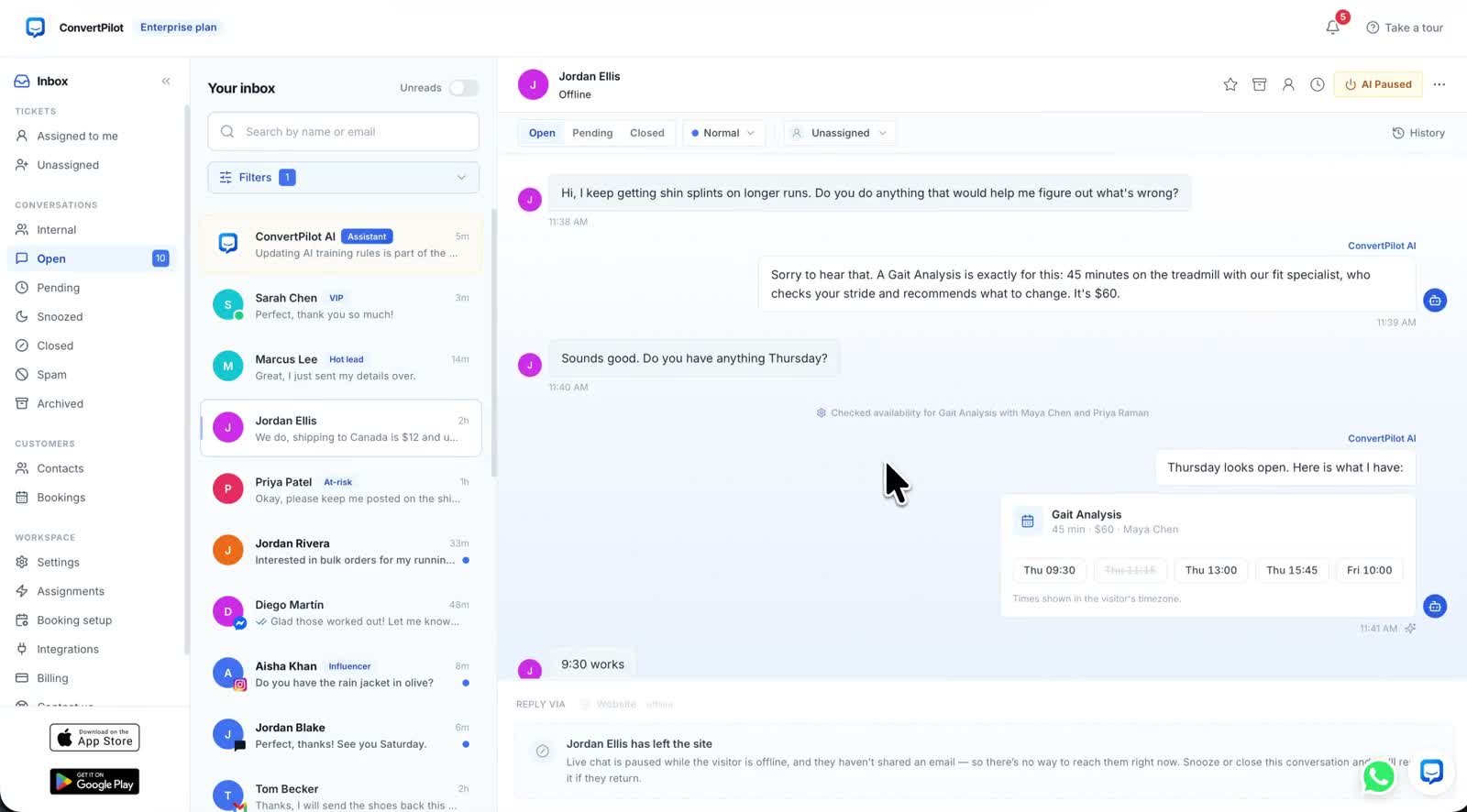
The tour clip shows the whole flow on one screen. A customer, Jordan Ellis in the demo workspace, asks about shin splints on longer runs. The agent recommends a Gait Analysis, says it is 45 minutes with a fit specialist and costs $60. Jordan asks about Thursday. The thread then shows a quiet line, “Checked availability for Gait Analysis with Maya Chen and Priya Raman”, followed by a card with the service, the price and the staff member, and a row of times to pick from.
Two details on that card matter more than they look. A slot that has already gone is shown struck through rather than hidden, so the customer can see the day is real. And the card says “Times shown in the visitor’s timezone”, which is the difference between a booking and a missed appointment when the customer is not where your shop is.
The agent should only ever offer times it has just checked, and only ever say “booked” once the booking exists. Everything else in this guide supports those two rules.
Set up services and staff before you switch the agent on
An agent cannot offer what it has not been given. The booking setup has a few parts, and it pays to do them in order, because each depends on the one before.
- Services. For each one: the duration, the price, any add-ons and the intake questions you need answered before the appointment. The agent quotes these exactly, so write the name the way a customer would say it.
- Staff and schedules. Assign staff to each service and set each person’s schedule and time zone. A service with no one assigned has no slots, and the agent will have nothing to offer.
- Payments. Connect your own Stripe account to take payment online, or choose to settle in person. Then set your cancellation window, because refunds inside it run automatically.
- Booking emails. Switch on the confirmation and reminder emails in your branding. There is a live preview, so read it as a customer would before it goes out.
- Then the agent. Add a Training entry saying which services the agent may book directly and which need a person first, such as anything that needs a consultation before it can be priced.
Where services and staff live, and how the rest of the console fits around them, is on the bookings page. If you are still deciding what the agent should know about your business before it answers anything, start with how to train an AI agent, which covers Training rules and the knowledge base.
A held slot is not a booking
When a customer picks a time and is sent to pay, the slot is held while they pay. That protects the customer from losing the time to someone else halfway through checkout. It also creates the moment where booking agents most often go wrong, because a hold looks like a booking from inside the conversation and is not one.
- Before payment, it is a hold. The right message is that the time is being held while they complete payment, with the payment link in the thread.
- After payment, it is a booking. Only now is it correct to say the appointment is booked, and the confirmation email follows.
- If payment does not happen, it was never a booking. A customer told “you’re booked” who then did not pay will turn up anyway, and your staff will not be expecting them.
- Pay in person is still a choice you make. If you settle payment at the appointment, there is no online payment step, so decide per service which applies.
This is also why the conversation and the booking should stay connected. In the bookings calendar every appointment carries the conversation it came from, so when a customer says the chat told them they were booked, you can open the thread and read exactly what was said. The Why this reply trace on each AI message shows which rules and sources shaped it.
Reading the day: the bookings calendar
The bookings screen is a day view with one column per staff member. The tour clip shows four headline numbers across the top: booked today, staff utilisation, paid today and awaiting payment. Each appointment shows the customer and the service, and a column can be a room rather than a person, which suits classes and group sessions.
| On the screen | What it tells you | What to do with it |
|---|---|---|
| Booked today | How many appointments are on the day | Compare with the same weekday last week before changing hours |
| Staff utilisation | How much of the scheduled time is booked | Low on one person, high on another: check which services each is assigned |
| Paid today | Payments already taken for the day | Nothing to chase |
| Awaiting payment | Bookings still without payment | The list to check before the day starts |
New bookings can also be added by hand from the same screen, for the customer who phones rather than chats, so the calendar stays the one place the day is planned.
Which channels can take a booking
Website live chat and email are on every plan, so a service business on Free or Plus can take bookings through the chat widget on its own site from day one. WhatsApp, Messenger, Instagram and Telegram are on Premium and above. How the agent behaves there is covered in WhatsApp AI customer service, and the WhatsApp channel page sets out the setup.
Staff do not need to sit at a desk to see what the agent booked. The iOS and Android apps carry the whole inbox with push notifications for new messages and handoffs; the mobile app page shows what is in them. The plan allowances, including AI replies per 30 days, are on the pricing page.
Some bookings should not be taken by the agent at all: a first consultation that needs a person to judge the problem, a complaint dressed as a booking request, a customer asking for a refund outside your window. Those belong in the handoff rules, set out in handing a chat to a person.