
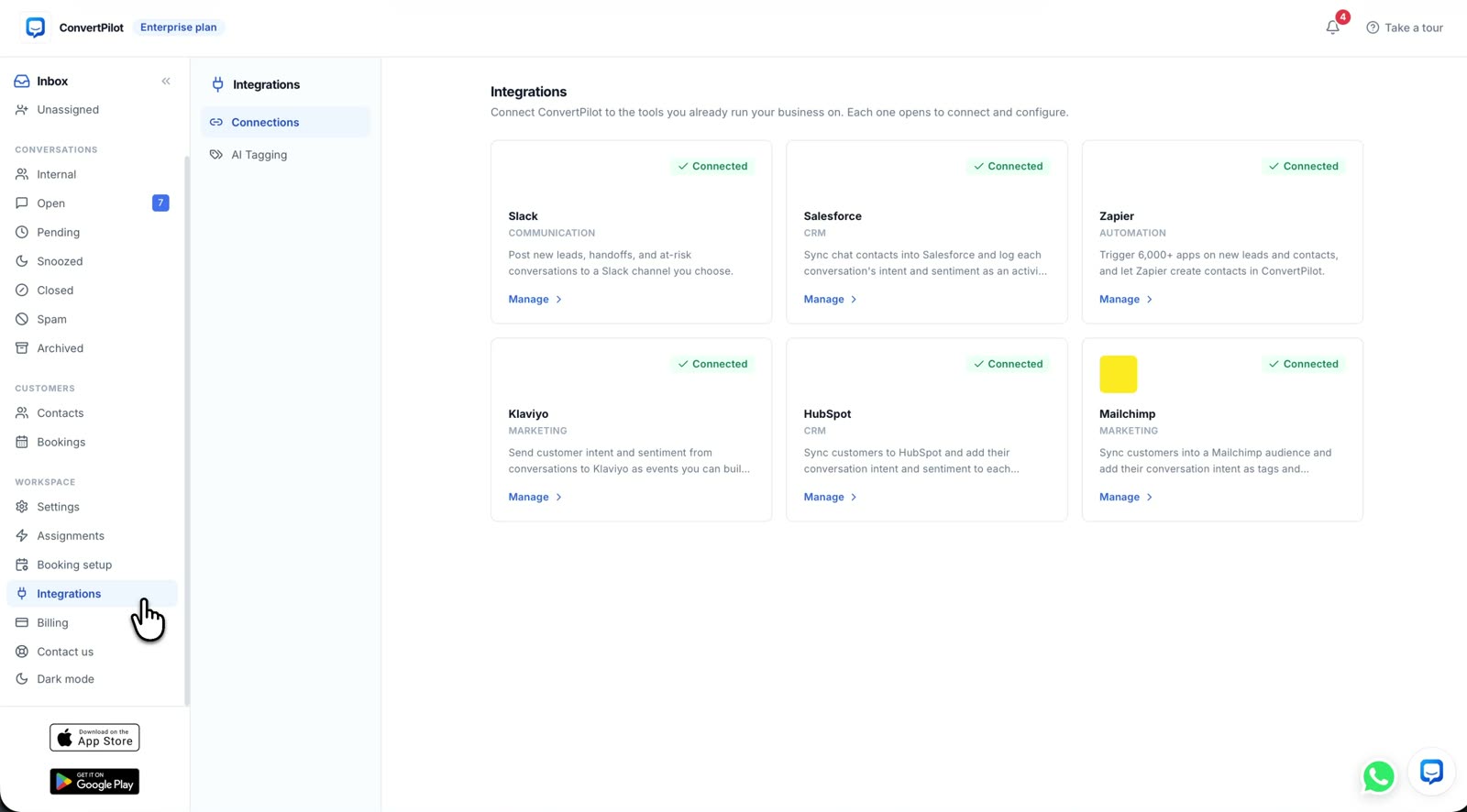
A Salesforce chatbot integration can mean two different jobs. One puts a bot inside Salesforce’s own messaging product. The other takes a conversation from your website or messaging channels and sends a captured lead into Salesforce. ConvertPilot does the second job: its agent answers in ConvertPilot, captures the person’s details, and creates a Salesforce lead with conversation intent and labels. Your sales team can see what the customer asked before following up. This guide shows how to connect and test that flow without assuming the CRM has become the chat inbox.
If you run a Shopify or Wix store, the useful test is a shopper asking about a product, giving contact details, and later appearing in Salesforce with the right reason for the enquiry. A successful connection screen is only the start. You also need a clear rule for who owns the lead, what happens when the person already exists in Salesforce, and where a request for a human goes.
What does a Salesforce chatbot integration actually do?
ConvertPilot keeps the conversation, AI reply and team handoff in its shared inbox. Its Salesforce integration creates captured leads in Salesforce with intent and labels on the record. The integration uses an OAuth connection from Settings, Integrations, Salesforce, Connect, then approval in Salesforce. It does not ask you to paste an API key. The console’s features page shows the lead capture, AI tagging and handoff that supply context before a record is sent.
This is distinct from Salesforce’s Bring Your Own Bot for Messaging, which connects an external bot to Salesforce’s own Enhanced Messaging and Agentforce Service workflow. Connecting ConvertPilot’s lead sync does not install the agent in Agentforce, route its live chats through a Salesforce service queue, or make Salesforce the source of answers. Choose the architecture for the work you actually need.
Test the whole path from customer question to Salesforce lead, not just the green connection state.
Which chat details should become a Salesforce lead?
Start with the details the customer has willingly given: a name and a way to contact them. In ConvertPilot, the agent captures name, email and phone when appropriate, while the contact profile keeps labels, notes, orders and the conversation history. AI tagging identifies subjects such as a price objection, shipping question, sizing question or high purchase intent. The Salesforce connection is described as creating a lead with the conversation intent and labels. Do not assume the whole transcript, an opportunity or a custom Salesforce field is created unless you have seen that happen in your own connected workspace.
The intent matters because a sales reply should begin where the customer left off. A shopper who asked whether a jacket comes in a particular size needs an answer about that size. A person asking for a bulk quote needs a person who can price it. A generic “thanks for your interest” email makes the integration look busy while leaving the original question unanswered. The AI tagging guide explains the difference between an intent tag, a team label and the contact profile.
| Moment to test | Check in ConvertPilot | Check in Salesforce | If it fails |
|---|---|---|---|
| Lead captured | The contact has the details the shopper gave and a conversation attached | A lead appears in the connected org | Check the connection and the capture step before editing rules |
| Intent labelled | The tag matches the shopper’s actual question | The lead carries the expected intent or label | Read the conversation and inspect the tag before using it in a sales queue |
| Sales follows up | The inbox still shows the full thread and any team handoff | The salesperson has enough context to answer the original question | Assign an owner and send a useful reply from the system your team uses |
| Existing person returns | The new conversation belongs to the right contact | Your Salesforce duplicate rule treats the record as intended | Review the rule and the existing record before another test |
Run the test with an address you control and a question whose answer you know. Then open the conversation in ConvertPilot and the lead in Salesforce side by side. Look at what actually arrived, rather than designing a sales automation around a field name you have not verified.
How do you connect and test ConvertPilot with Salesforce?
The Salesforce connection is on Premium and above, as shown on pricing. The chat widget and lead capture can be tested before the CRM connection is added, which makes the order of setup straightforward. You can use Shopify, Wix or a custom site for website live chat; the same inbox and Salesforce connection sit behind them.
- Prepare one answer. Check a product, return or delivery page the agent will read. Put an exact policy answer and a handoff boundary in Training if the public page is not enough.
- Connect Salesforce. In the ConvertPilot console open Settings, Integrations, Salesforce, Connect and approve the OAuth connection in the intended Salesforce org.
- Send a controlled chat. Ask a real product or booking question from your published widget, provide a test name and contact address, and confirm the conversation appears in the inbox.
- Inspect the lead. Find the test person in Salesforce. Check that a lead was created and that the intent and labels reflect the question, using the table above.
- Test a return visit. Ask a second question as the same person and inspect how your Salesforce duplicate rules treat it before allowing a larger flow to run.
- Assign the next action. Decide which salesperson reads the lead and how soon your team will respond. A lead with no owner is only a record, not a follow-up.
The last step is an operating choice for your business, not a feature the integration can decide for you. Test one common question and one question requiring judgement. If the latter asks for a person, the human handoff guide shows how to check that the request reaches your team without losing the thread.
How do you prevent duplicate leads and false promises?
Salesforce documents duplicate rules for leads, contacts and accounts. An org can allow, warn about or block a record depending on its configuration. ConvertPilot’s product description promises captured leads in Salesforce; it does not promise a particular duplicate policy, an upsert into an existing contact, or a resolution of conflicting records. Check your org’s active rules with your Salesforce owner, then make two controlled tests before relying on the connection.
The other false promise is about the chat itself. A Salesforce lead is not evidence that the agent solved the customer’s question. Read the reply in the ConvertPilot inbox, open Why this reply to see its sources and rules, and compare any product or order claim with the store record. If the agent cannot verify a delivery date or a policy exception, it should ask for a person rather than invent one. Keep the CRM record useful by keeping the conversation truthful.
When should sales take over, and which plan fits?
Sales should take over when the customer asks for a quote, has a complex need, requests a person or needs a decision outside your written rules. In ConvertPilot, a teammate joining the conversation pauses the agent, and the history stays in the inbox. Set Online hours and an owner so the customer is told when a person can answer. The channels page shows where those conversations can begin, including website chat and the messaging channels available on higher plans.
The Salesforce integration is listed on Premium and Enterprise. Website live chat and email are available on Free, but the outbound CRM connection is not. Check the current plan table before promising a sales workflow to your team. If you only need to test whether shoppers ask useful questions, begin with the inbox and its Training. If the team already works leads in Salesforce, connect the CRM once you can name the owner, verify the intent field in your org and follow up on a real enquiry.